
Financial reporting automation for SMEs is becoming essential for businesses that want faster reports, fewer manual errors, and better control over cash flow, receivables, payables, sales, purchases, inventory, and expenses. For many small and medium-sized businesses, financial reporting still depends on Excel sheets, manual entries, and delayed month-end updates. This makes it difficult for owners and finance teams to see the real financial position of the business on time.
SMEs often run lean teams. One person may handle accounts, bank reconciliation, vendor payments, receivables, stock reports, and management reporting. As the business grows, manual reporting becomes harder to manage. Reports take longer to prepare, mistakes become more common, and management decisions are made with outdated information.
This is where automated financial reporting helps.
Instead of collecting data from different files and systems, automation allows businesses to generate accurate financial reports from one integrated platform. When accounting, inventory, sales, purchases, receivables, payables, and operations are connected, reporting becomes faster, cleaner, and more reliable.
For SMEs that want better financial control, automation is no longer optional. It is a practical step toward smarter business management.
What Is Financial Reporting Automation?
Financial reporting automation is the process of using software to automatically collect, process, organize, and present financial data in the form of reports.
Instead of manually preparing reports in spreadsheets, businesses can generate reports directly from live business data.
This may include data from:
- Sales invoices
- Purchase bills
- Receipts
- Payments
- Inventory movement
- Bank transactions
- Customer balances
- Vendor balances
- Expenses
- Tax records
- Production or trading operations
- Financial accounts
In simple words, financial reporting automation helps businesses convert daily transactions into useful reports without repeated manual work.
For example, when a sales invoice is entered into an ERP system, it can automatically update customer receivables, sales reports, tax summaries, inventory records, and financial accounts. This reduces duplicate entry and improves reporting accuracy.
Why SMEs Need Automated Financial Reporting
SMEs need quick and accurate information. Business owners cannot wait until the end of the month to know whether sales are improving, cash flow is weak, inventory is stuck, or receivables are increasing.
Manual reporting often creates delays.
By the time a report is prepared, the situation may already have changed.
Automated financial reporting helps SMEs by giving management timely visibility into the business. It allows owners, finance teams, and department heads to review important information without waiting for manual compilation.
Key reasons SMEs need automation
- Faster financial reports
- Fewer manual errors
- Better cash flow visibility
- Improved receivable and payable tracking
- Stronger accounting control
- Easier audit preparation
- Better decision-making
- Reduced dependency on Excel
- More confidence in business data
For growing SMEs, financial reporting automation also supports scalability. As transaction volume increases, manual reporting becomes more difficult. Automation helps the business grow without increasing reporting complexity.
Common Financial Reporting Challenges for SMEs
Many SMEs face similar reporting problems. These problems may look small at first, but they can affect cash flow, profitability, and management decisions.
1. Too much dependency on Excel
Excel is useful, but it becomes risky when it becomes the main reporting system.
Common Excel-related issues include:
- Formula mistakes
- Duplicate files
- Wrong versions
- Manual copy-paste errors
- Missing data
- No proper approval history
- Limited access control
- Difficult audit tracking
When financial reporting depends on multiple spreadsheets, it becomes hard to know which report is final and which data is accurate.
2. Reports are prepared too late
Many SMEs prepare financial reports after the month ends. This means business owners may not know the current position of cash, sales, expenses, receivables, or payables during the month.
Late reporting leads to late decisions.
If receivables are increasing, management should know early. If expenses are rising, the finance team should be able to identify the issue before it affects profitability.
3. Receivables and payables are not clear
Cash flow problems often start when businesses do not have clear visibility into receivables and payables.
SMEs need to know:
- Which customers owe money?
- Which invoices are overdue?
- Which vendors need payment?
- What payments are due this week?
- Which customers are delaying collections?
- What is the total outstanding amount?
Without automated reports, these answers may require manual checking from invoices, ledgers, and payment records.
4. Data is entered multiple times
In many businesses, the same transaction is entered in different places.
For example:
- Sales team records the order.
- Accounts team prepares the invoice.
- Inventory team updates stock.
- Finance team updates receivables.
- Management reporting is updated separately.
This creates duplication and increases the chance of mistakes.
A connected ERP system reduces duplicate entry because one transaction can update multiple related records.
5. Inventory and finance are disconnected
For trading and manufacturing SMEs, inventory has a direct impact on financial reporting.
If inventory records are not connected with finance, management may not have accurate information about:
- Stock value
- Cost of goods sold
- Slow-moving inventory
- Purchase requirements
- Inventory losses
- Warehouse movement
- Production consumption
Financial reports become incomplete when stock data is not accurate.
6. Audit trails are weak
Manual reporting often lacks proper audit trails. It may be difficult to identify who changed a transaction, when it was changed, and why it was changed.
This creates risk for finance teams.
Automated systems with user rights and logs help businesses maintain better accountability.
Key Financial Reports SMEs Should Automate
Not every report needs to be complex. SMEs should begin by automating the reports that directly support daily control and decision-making.
1. Profit and Loss Report
The profit and loss report shows whether the business is making profit or loss during a specific period.
It helps management track:
- Revenue
- Cost of sales
- Gross profit
- Operating expenses
- Net profit
- Profit margins
Automating this report helps business owners review performance without waiting for manual month-end calculations.
2. Balance Sheet
The balance sheet gives a snapshot of the company’s financial position.
It includes:
- Assets
- Liabilities
- Equity
- Customer balances
- Vendor balances
- Cash and bank position
- Inventory value
For SMEs, an automated balance sheet helps improve financial discipline and supports better planning.
3. Cash Flow Report
Cash flow is one of the most important reports for SMEs.
A business may be profitable on paper but still face cash problems if collections are delayed or payments are poorly planned.
Automated cash flow reporting helps track:
- Cash inflows
- Cash outflows
- Bank position
- Customer collections
- Vendor payments
- Upcoming liabilities
This helps management make better decisions about purchases, expenses, investments, and payments.
4. Receivable Aging Report
Receivable aging shows how much money customers owe and how long payments have been outstanding.
It usually groups receivables by time periods such as:
- 0–30 days
- 31–60 days
- 61–90 days
- More than 90 days
This report helps businesses improve collections and reduce cash flow pressure.
5. Payable Aging Report
Payable aging shows what the business owes to suppliers and vendors.
It helps finance teams plan payments and avoid missed obligations.
A good payable report helps answer:
- Which bills are due?
- Which vendors need urgent payment?
- What is the total payable amount?
- Are there overdue vendor balances?
- What payments should be planned this week?
6. Sales Report
Sales reports help SMEs understand revenue performance.
Automated sales reports may show:
- Sales by customer
- Sales by product
- Sales by region
- Sales by salesperson
- Monthly sales trends
- Pending orders
- Sales returns
This allows management to track growth and identify strong or weak areas.
7. Purchase Report
Purchase reports help control procurement and vendor spending.
They can show:
- Purchase by vendor
- Purchase by item
- Pending purchase orders
- Purchase returns
- Monthly purchase trends
- Cost comparison
For SMEs, this helps improve purchasing control and reduce unnecessary spending.
8. Inventory Valuation Report
Inventory valuation helps businesses understand the financial value of stock.
This is especially important for manufacturing and trading businesses.
An automated inventory valuation report supports:
- Stock control
- Cost calculation
- Financial accuracy
- Purchase planning
- Warehouse management
- Profitability analysis
9. Expense Report
Expense reporting helps management track business costs.
Automated expense reports can show:
- Department-wise expenses
- Category-wise expenses
- Monthly expense trends
- Unusual expenses
- Budget comparison
- Approved and pending expenses
This helps SMEs control spending before it affects profit.
10. Tax Reports
Tax reporting is a sensitive area for any business.
Automated tax reports help finance teams organize tax-related data from sales, purchases, deductions, and payments.
This improves accuracy and reduces last-minute pressure during filing and reconciliation.
Benefits of Financial Reporting Automation for SMEs
Financial reporting automation offers more than convenience. It improves how the business is managed.
1. Faster reporting
Manual reports can take hours or days to prepare. Automated reports can be generated much faster because data is already available in the system.
This helps management review business performance on time.
2. Better accuracy
Manual reporting increases the risk of mistakes.
Automation reduces errors caused by:
- Repeated data entry
- Wrong formulas
- Missing transactions
- Copy-paste mistakes
- Outdated spreadsheet versions
When reports are generated from live system data, they become more reliable.
3. Real-time visibility
SMEs need visibility into what is happening now, not only what happened last month.
Automated reporting helps management track current sales, collections, payments, inventory, expenses, and cash position.
This improves business control.
4. Improved cash flow management
Cash flow is a major concern for SMEs.
Automated receivable and payable reports help management plan collections and payments more effectively.
This reduces surprises and improves financial planning.
5. Stronger internal control
Automation supports approval workflows, user rights, audit trails, and transaction history.
This helps businesses reduce unauthorized changes and improve accountability.
6. Better decision-making
Good decisions need good data.
When reports are accurate and available on time, management can make better decisions about pricing, purchasing, inventory, expenses, hiring, and business expansion.
7. Less pressure on finance teams
Finance teams spend a lot of time preparing reports manually.
Automation reduces repetitive reporting work so finance teams can focus on analysis, planning, and business support.
How Financials.Partners Helps Automate Financial Reporting
Financials.Partners connects different business functions into one system.
For SMEs, this is important because financial reporting does not depend only on accounting entries. It also depends on sales, purchases, inventory, production, payments, receipts, and business operations.
Financials.Partners connects finance with operations
- Financial accounts
- Sales
- Purchases
- Inventory
- Receivables
- Payables
- Production
- Supply chain
- Cash and bank
- Reporting
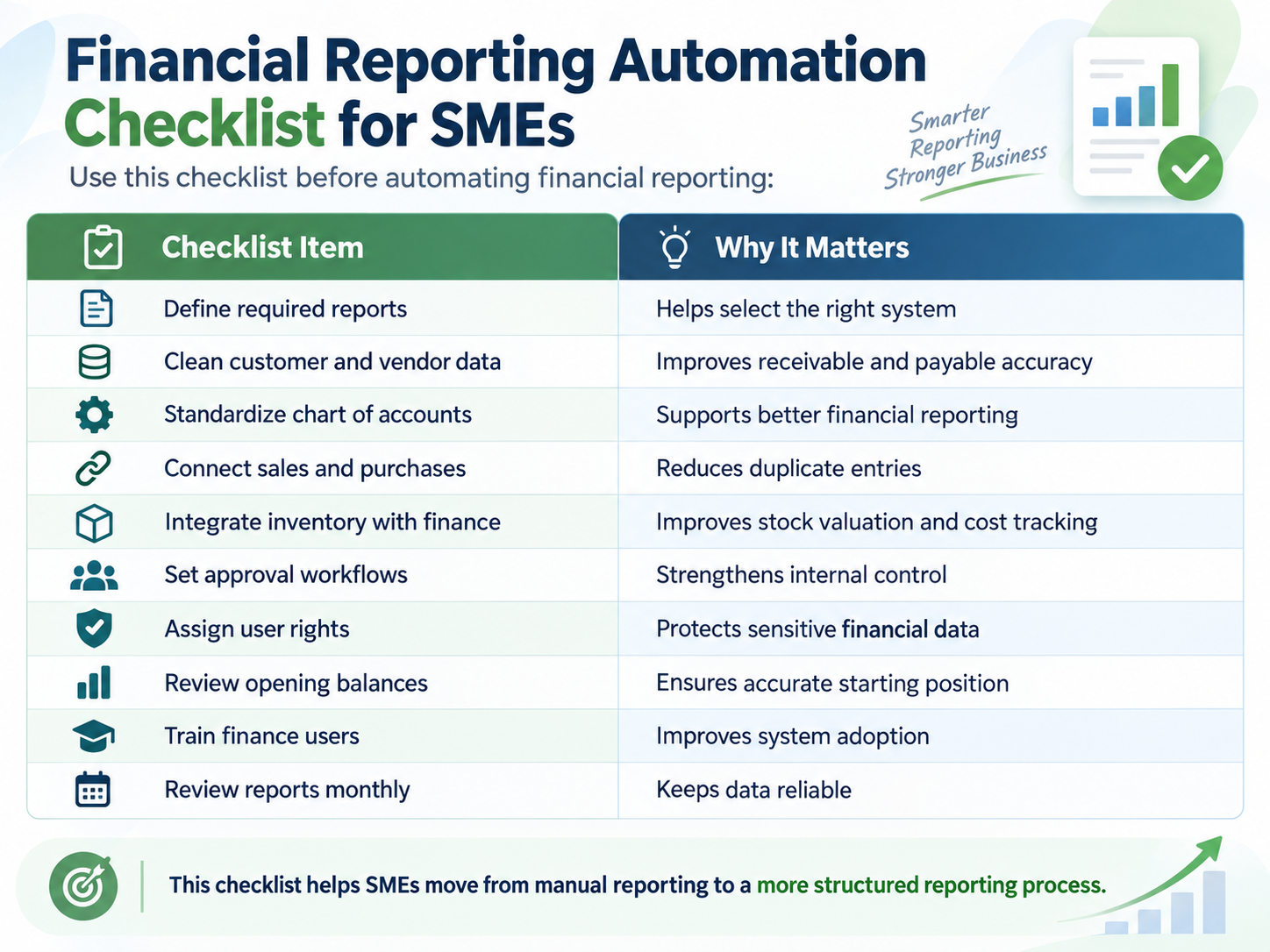
When these modules are connected, reports become more complete and accurate.
For example, when inventory is issued for production, the system can update stock records, cost reports, and financial accounts. When a customer invoice is posted, it can update sales, receivables, tax records, and ledgers.
Why Financials.Partners Is Useful for SMEs
Financials.Partners is an integrated ERP and financial management software in Pakistan designed to help businesses manage financial accounts, inventory, sales, purchases, receivables, payables, and operational workflows through one platform.
For SMEs, the value of Financials.Partners is not just automation. It is better control.
The system helps businesses bring finance and operations together, so reports are based on connected business activity instead of disconnected files.
Financials.Partners supports businesses in areas such as:
- Financial accounts
- Sales management
- Purchase management
- Inventory and stock control
- Receivables
- Payables
- Trading operations
- Manufacturing workflows
- Supply chain processes
- Reporting and dashboards
This makes it suitable for SMEs that want to reduce manual work, improve reporting accuracy, and gain better visibility into business performance.
How Financials.Partners Helps Improve Reporting
Centralized financial data
Financials.Partners helps businesses keep accounting and operational records in one system. This reduces scattered data and improves reporting consistency.
Better receivable and payable tracking
SMEs can monitor customer outstanding balances, vendor payments, collections, and dues more clearly.
Integrated inventory and finance
Inventory movement can be connected with financial reporting, helping businesses understand stock value and operational cost more accurately.
Real-time business visibility
Reports and dashboards help management track performance, cash flow, sales, purchases, and operational activity with better clarity.
Stronger control and accountability
User rights, approvals, and structured workflows help reduce unauthorized changes and improve internal control.
Who Should Use Financial Reporting Automation?
Financial reporting automation is useful for SMEs across different industries.
It is especially helpful for:
- Trading businesses
- Manufacturing businesses
- Distribution companies
- Retail businesses
- Service companies
- Import and export businesses
- Multi-branch SMEs
- Businesses with inventory
- Businesses with high receivables
- Businesses with complex vendor payments
If your finance team spends too much time preparing reports manually, it may be time to automate.
Signs Your Business Needs Automated Financial Reporting
Your SME may need financial reporting automation if:
- Reports are always delayed
- Excel files are difficult to manage
- Receivables are unclear
- Vendor payments are hard to track
- Inventory and accounts do not match
- Management depends on manual summaries
- Month-end closing takes too long
- Financial data is scattered across departments
- Reports change depending on who prepares them
- Audit preparation is stressful
These are signs that the business needs a more connected and reliable system.
Final Thoughts
Financial reporting automation helps SMEs move from delayed, manual, and error-prone reporting to faster, more accurate, and more reliable business visibility.
For growing businesses, reports should not be prepared only after problems appear. Management should have access to updated financial information when decisions need to be made.
Automated reporting improves accuracy, saves time, strengthens cash flow control, supports better decision-making, and reduces dependency on spreadsheets.
For SMEs in Pakistan, Financials.Partners provides an integrated ERP platform that connects financial accounts, sales, purchases, inventory, receivables, payables, and reporting. This helps businesses manage operations more efficiently and make decisions with greater confidence.